Sodatide Blog
Why the Sodatide Supplement Facts Panel Appears as Both a Photo and a Text Table
Quick answer
Because a photograph of a label is, to a screen reader, just a picture, not text. Sodatidenow’s Supplement Facts page shows the printed panel as an image with a descriptive alt attribute, and then repeats every line, ingredient, amount and footnote, in a real HTML table underneath. That second version is what satisfies WCAG 2.1 Success Criterion 1.1.1, which requires a text alternative for non-text content. The physical label itself is separately governed by a minimum type-size rule under 21 CFR 101.36, a rule a web photo cannot enforce on its own.
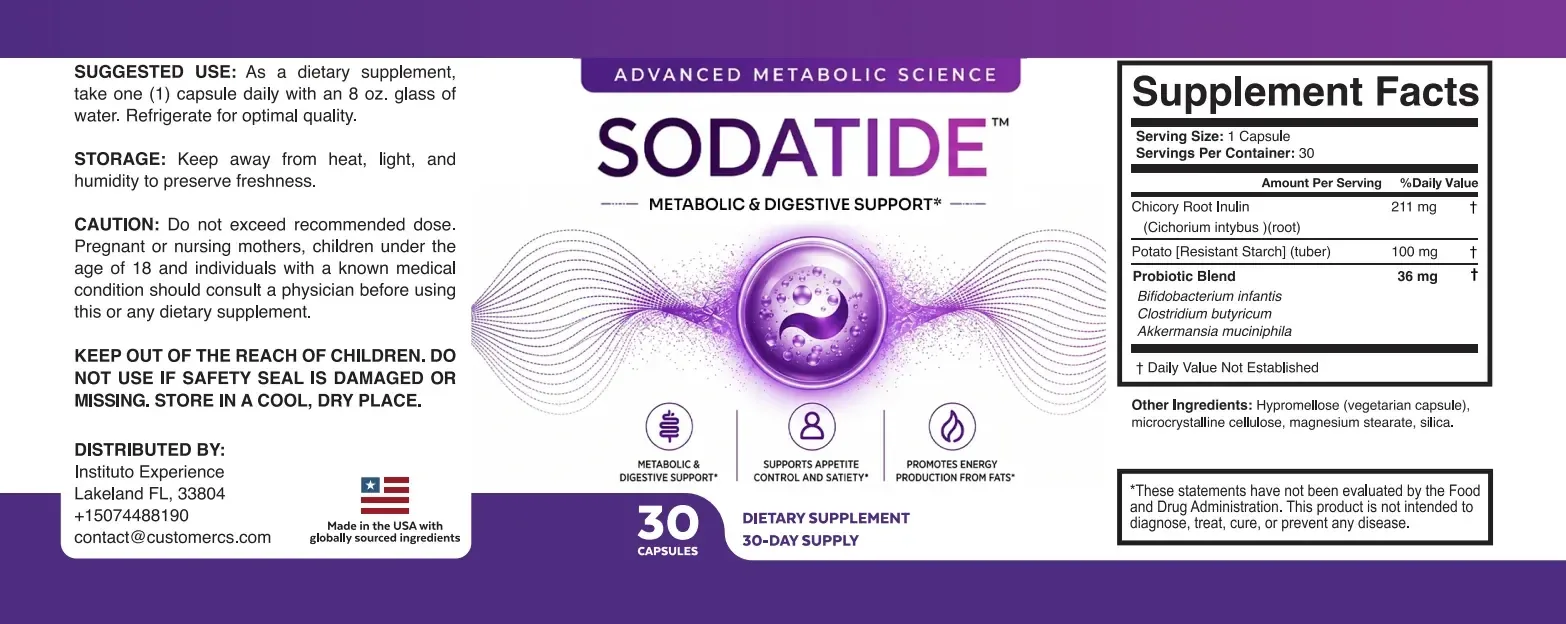
Open the Sodatide Supplement Facts page and you will see the label twice: once as a photograph of the actual printed panel, and once as a plain HTML table that lists the same serving size, ingredients, amounts and footnote in ordinary text. That is not a design accident or duplicated effort. It is two different rules, one about web accessibility and one about what has to be printed on the physical bottle, both pointing at the same design choice.
What’s there
What is actually on the Supplement Facts page?
Before explaining why, it is worth being precise about what the page actually contains, since it is easy to assume more or less is there than really is.
- The photo
- A single image of the flattened label, with the alt text “The complete Sodatide label laid flat, with directions, front panel and Supplement Facts box.”
- The text table
- A separate HTML table titled “Sodatide Supplement Facts, as printed,” with a row for Serving Size, Servings Per Container, each of the three actives, and the † footnote, each with a plain-language “what it means” column.
- What is not there
- There is no hidden, screen-reader-only transcript buried in the markup. The text version is a normal, visible table, not an invisible duplicate.
That last point matters, because it would be easy to assume a site like this hides a wall of text for screen readers and shows only the photo to everyone else. It does not. Both versions are visible to every reader; the table simply does the job the photo’s alt text cannot do alone.
WCAG
Why would a label photo alone fail an accessibility rule?
Web Content Accessibility Guidelines (WCAG) 2.1 is the standard most sites, this one included, are built against. Success Criterion 1.1.1 speaks directly to images that contain text.
A photograph of a Supplement Facts panel is, technically, “non-text content” under that rule, even though it is a picture of words. A screen reader cannot read the serving size or the milligram amounts out of a JPEG or WebP file. It can only read whatever text alternative the page gives it, which is normally the image’s alt attribute.
An alt attribute alone has a real limit, though: it has to stay short enough to be usable, which means it can describe the image (“the complete label laid flat”) but cannot reasonably contain every ingredient, amount and footnote from the panel itself. That is the gap the separate text table closes. Rather than cramming the whole label into one alt attribute, the page gives every reader, sighted or not, the same data in an ordinary, readable table. That is a well-documented WCAG technique for exactly this situation: pair an image with a full text equivalent placed in the normal content flow, not hidden away.
21 CFR 101.36
What does federal law require on the physical label itself?
Separately from any website rule, the printed Supplement Facts panel on the actual bottle has its own federal format and type-size requirements.
| Requirement | What the regulation says |
|---|---|
| The box itself | The nutrition information “shall be enclosed in a box by using hairlines” — 21 CFR 101.36(e)(2) |
| The title’s size | “The title, ‘Supplement Facts,’ shall be set in a type size larger than all other print size in the nutrition label” — 101.36(e)(1) |
| The body text floor | Other information must use “uniform type size no smaller than 8 point,” with column headings allowed down to 6 point — 101.36(e)(4) |
| Where it sits on the package | Panel location “shall be in compliance with §101.2” — 101.36(g), meaning the Principal Display Panel or the Information Panel |
| Small packages | Packages under 12 square inches may use type as small as 4.5 point for the whole nutrition label — 101.36(i)(2)(i) |
None of that is about screen readers. It is a printing and legibility standard for the physical object. A 30-capsule bottle is small, which is exactly the kind of package the smaller type-size allowances in 101.36(i) exist for, and exactly why a panel that reads clearly on the bottle can still be hard to read once compressed into a product photo on a phone screen.
Why not just zoom
Why can’t a bigger photo just replace the text table?
It seems like a high-resolution photo should solve both problems at once. It solves one and leaves the other exactly where it was.
A larger or higher-resolution photo can make small print more legible for a sighted reader who is willing to pinch-zoom. It does nothing for a screen reader, because the underlying problem is not image resolution, it is that the content is pixels, not text, at any resolution. WCAG 1.1.1 is about whether assistive technology can extract the information, not about how sharp the picture looks to a human eye.
That is the real reason the page keeps both versions rather than picking one. The photo answers “what does the actual printed label look like,” which matters for anyone trying to match a bottle in hand against what the page describes. The text table answers “what does the label actually say,” in a form every browser, screen reader and search engine can parse. Neither version alone does both jobs.
Line by line
How the text table maps onto the printed panel
Every row in the text table corresponds to a specific printed line, with nothing added and nothing smoothed over.
| Printed line | Text table row |
|---|---|
| Serving Size: 1 capsule | Reproduced exactly, with a plain-language note that one capsule is one full serving |
| Chicory Root Inulin, Cichorium intybus (root), 211 mg † | Reproduced exactly, including the botanical name and part-of-plant note |
| Potato [Resistant Starch] (tuber), 100 mg † | Reproduced exactly, including the tuber designation |
| Probiotic Blend, 36 mg †: three named species | Reproduced exactly, with each species spelled out in full |
| † Daily Value Not Established | Reproduced exactly, with an explanatory sentence added below it |
The “what it means” column the text table adds is clearly separated from the quoted label line itself, which keeps the page’s own standard: quote the label first, then explain. The full line-by-line transcription, including the front panel and the directions panel, is on the Supplement Facts page itself.
The † mark
Does the † symbol survive the translation into text?
A dagger symbol is a small, easy detail to lose when text is read aloud. It is worth checking that it was not.
In the photo, the † appears as a small raised symbol next to each ingredient line, standard on supplement labels. In the text table, the same mark is written out inline after each amount, and the table includes its own row spelling out what it means: “Daily Value Not Established.” A screen reader encountering the HTML version reads the word, or an equivalent description, rather than skipping a symbol it cannot interpret, which is a small but real example of why a text equivalent has to cover more than just the headline numbers.
Our take
Our verdict: is showing the label twice worth it?
Yes, and for two separate reasons that happen to point the same way. WCAG 2.1’s Success Criterion 1.1.1 asks for a real text alternative to non-text content, and a short alt attribute cannot carry an entire Supplement Facts panel on its own. Separately, 21 CFR 101.36 governs how the physical label has to be printed, with its own type-size floor, which is a reminder that the printed panel and the web photo of it are not interchangeable in the first place.
Showing the panel as both a photo and a plain-text table is the straightforward way to satisfy the first concern without pretending to solve the second one, since no website display format changes what is physically printed on the bottle in your hand.
Common questions
Facts panel: image and text, common questions
Does sodatidenow.com publish the Supplement Facts panel as only a photo?
No. The page publishes a photo of the printed panel and a separate plain-text table beneath it that repeats every line, ingredient, amount and footnote.
Is there a hidden, screen-reader-only version of the label on the page?
No. We checked the page’s markup directly. There is no visually-hidden duplicate text block. The text table is a normal, visible element that every reader sees, not an invisible screen-reader-only trick.
Does WCAG 2.1 require every product photo to carry a full text transcription?
No. Only non-text content that conveys information needs a true text equivalent under SC 1.1.1; purely decorative images are exempt. A label photo that conveys regulated facts does need an equivalent, which the table provides.
Does a bigger or sharper photo satisfy 21 CFR 101.36’s type-size rule online?
No. That rule governs the physical printed panel on the bottle itself, not a website photo of it. A web image’s resolution has no bearing on what is actually printed on the label in your hand.
Where can I read the whole label, not just the Supplement Facts box?
The Supplement Facts page transcribes the front panel, the directions panel and the Supplement Facts box, line by line, alongside the same photo discussed here.
Sources
Sources
We opened and checked each source before citing it. Links go to the standards body or the federal regulation.
- World Wide Web Consortium (W3C). Web Content Accessibility Guidelines (WCAG) 2.1, Success Criterion 1.1.1 Non-text Content. Open source
- 21 CFR §101.36, Nutrition labeling of dietary supplements. Open source
- 21 CFR §101.2, Information panel of package form food. Open source
- Sodatidenow. Sodatide Supplement Facts label transcription and photo. Open source